Coffee Subscription

Case study — SAP ABAP RAP (Managed, Draft, OData V4, Fiori Elements)

RAP CDS BDEF Draft Validations Determinations OData V4 ADT
Quick navigation

Business context & case study

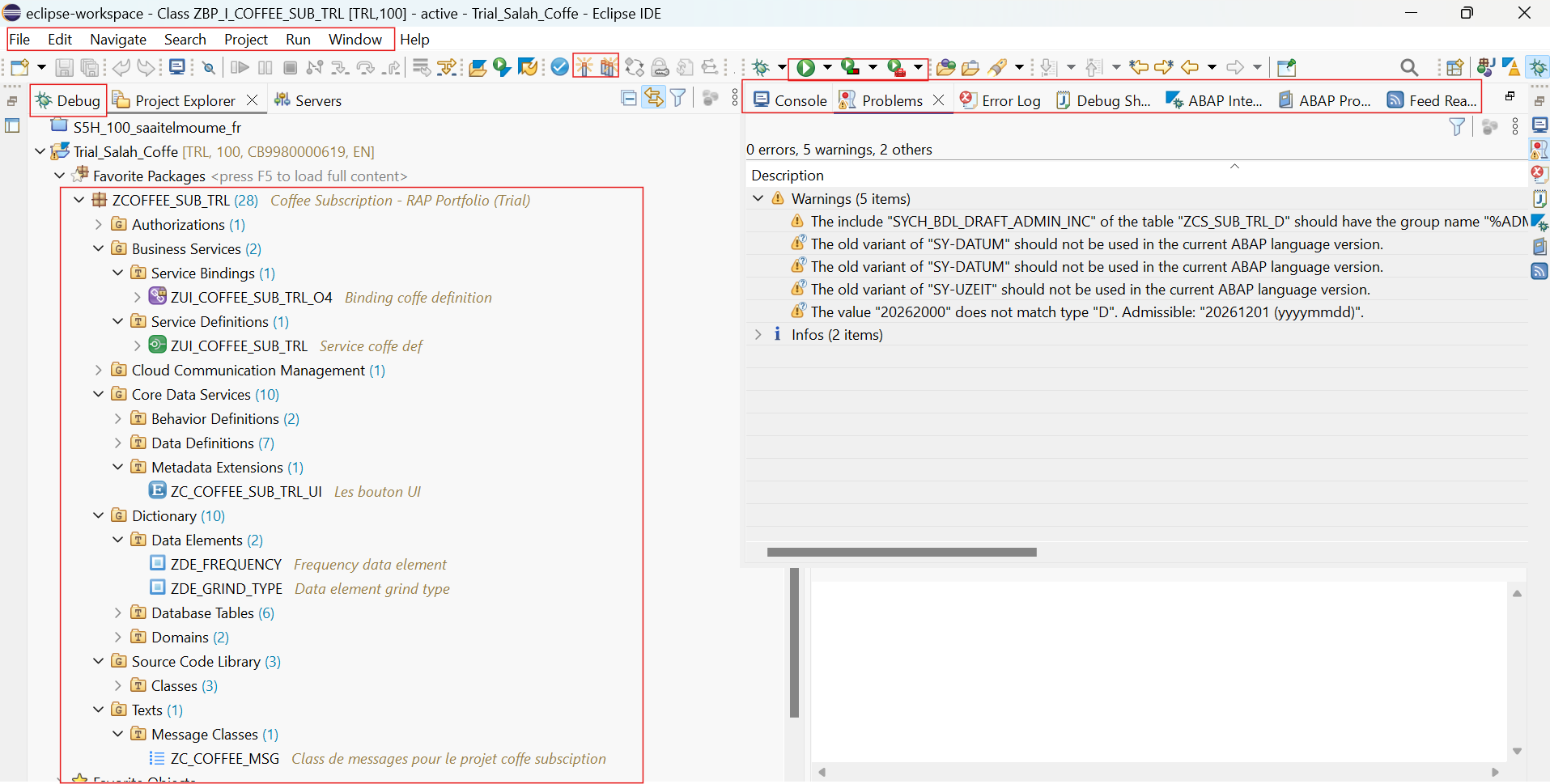
This project is part of my RAP upskilling, carried out alongside client work. The goal is to simulate a production-like case with a robust architecture, clear business rules, a clean Fiori UI, and a realistic debug path, while following SAP best practices for a clean and maintainable delivery.

What this project demonstrates
  • Ability to design a complete RAP business object
  • Understanding of the business ↔ technical link
  • Mastery of key concepts (draft, validations, determinations)
  • Production-like delivery approach

Simulated business case — Coffee Subscription

The Coffee Subscription application simulates a realistic subscription management business case, inspired by production scenarios (customer subscriptions, recurring contracts, scheduled services).

The principle is intentionally simple and representative: a customer subscribes by choosing a coffee type, a delivery frequency, and a subscription status. These are managed throughout the subscription lifecycle: creation, change, validation, and activation.

From a business perspective, this is comparable to:

  • service subscriptions (SaaS, maintenance, recurring contracts),
  • customer contracts with specific management rules,
  • and more broadly critical business objects requiring tight lifecycle control.

This project reproduces production-like challenges, including:

  • data control during creation and update,
  • state management through draft mode,
  • blocking business validations,
  • automatic determinations,
  • and exposing a consistent, guided Fiori UI for end users.

The goal was not to build a simple demo app, but to design a clean, extensible, maintainable architecture aligned with SAP RAP best practices, in a flow close to a real project context.

Architecture

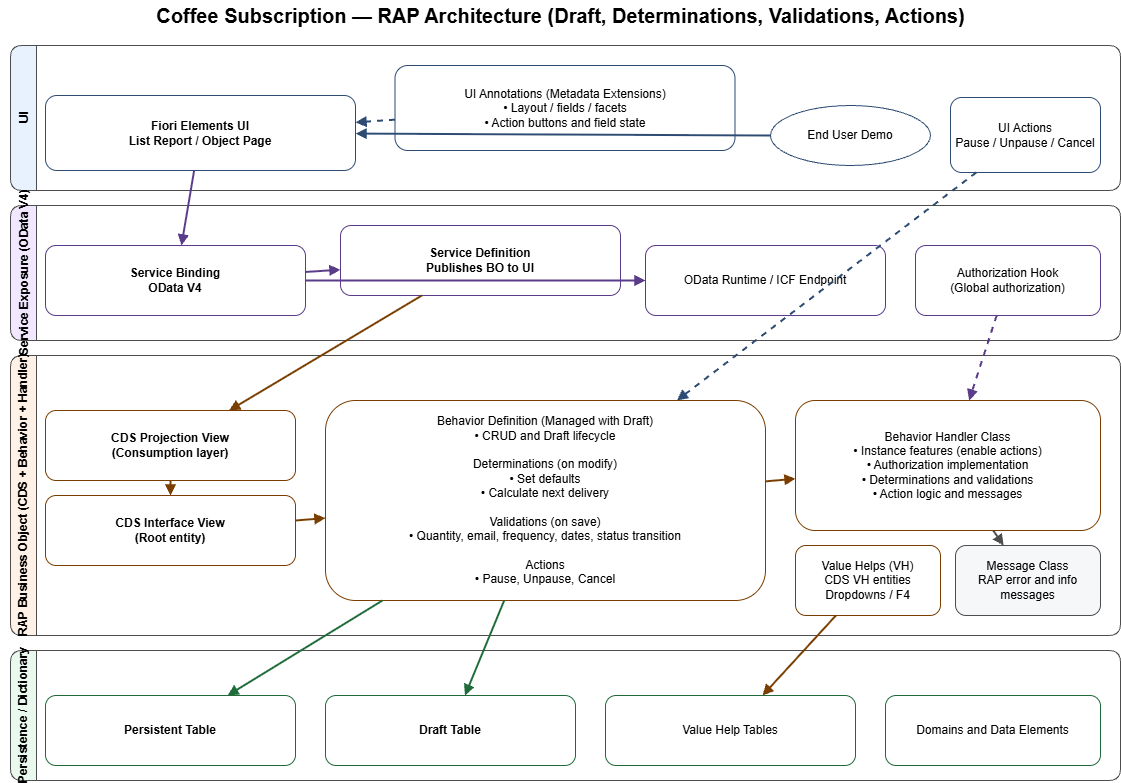
Coffee Subscription architecture diagram
See explanation
The application architecture is based on the Managed RAP model, which separates responsibilities between data, business behavior, and the user interface.
Persistence tables store active and draft data. CDS Interface Views (ZI) define the semantic model and business relationships. CDS Projection Views (ZC) expose only the fields required by the UI and carry the Fiori annotations.
The Behavior Definition (BDEF) centralizes transactional rules: create, update, delete, validations, determinations, and actions. The Service Definition and OData V4 Service Binding then expose these objects to the interface.
Finally, the Fiori Elements UI is generated automatically from metadata, ensuring a consistent, maintainable application aligned with SAP standards.
This architecture is extensible and close to real project contexts, while making functional and technical evolutions easier.

ADT artifacts

Type Example Role
Tables ZCS_SUB_TRL, ZCS_SUB_TRL_D Persistence + draft
CDS Interface ZI_COFFEE_SUB_TRL Business model
CDS Projection ZC_COFFEE_SUB_TRL, ZC_*_VH UI exposure
Behavior ZBP_I_COFFEE_SUB_TRL Rules and draft
Service ZUI_COFFEE_SUB_TRL + Binding O4 OData V4

Timeline

1. Tables

Goal: structure persistence and draft data.
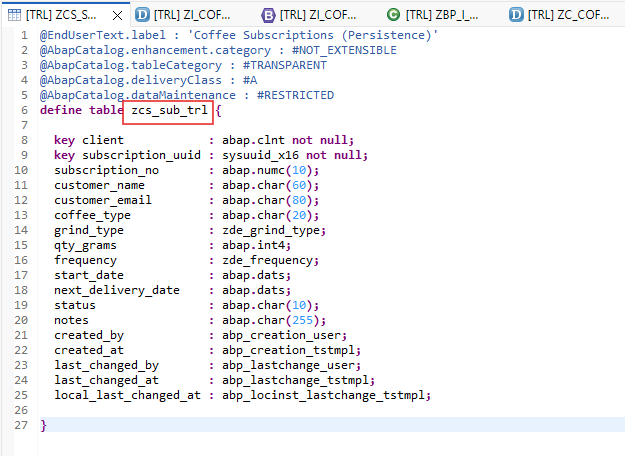
ADT tables screenshot
See explanation
Role of tables in RAP architecture
In SAP RAP, tables are the persistence foundation and are more structured than in classic ABAP.
A persistence table stores active business data (validated subscriptions). A linked draft table stores temporary changes until the user validates the record.
This separation enables a guided, secure user experience without affecting active data until business rules are satisfied.
Compared with classic ABAP
In classic ABAP, data is often written directly at SAVE time, and intermediate states are handled via:
  • temporary Z tables,
  • status flags,
  • or complex application logic.
In RAP, draft handling is native, which:
  • reduces code complexity,
  • improves transactional robustness,
  • standardizes application behavior.
Position in the RAP architecture
Tables are the starting point of the RAP flow:
  • they feed CDS Interface Views (ZI),
  • which are projected to the UI,
  • and handled via the Behavior Definition.
This model ensures a clear separation between data, business logic, and UI, aligned with modern SAP best practices.
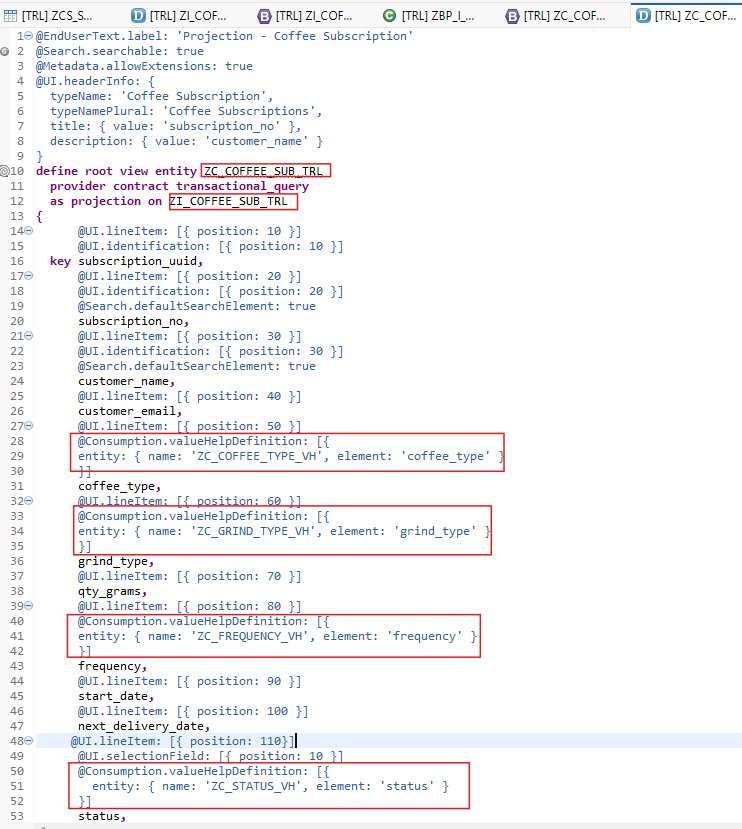
2. CDS

Goal: model ZI and ZC projections.

ADT CDS screenshot
See explanation
CDS Interface & CDS Projection in RAP
CDS Interface View (ZI_*)
CDS Interface Views represent the core semantic model of the business object in RAP. Built on persistence and draft tables, they define structure, associations, keys, and semantic aspects (types, units, statuses).
ZI views are stable and UI-independent, designed to be reusable and extensible over time.
Key role
The CDS Interface is the source of business truth: it describes what the object is, without focusing on how it is displayed.
CDS Projection View (ZC_*)
CDS Projection Views expose a controlled, UI-oriented view of the business object.
They allow you to:
  • select only the fields required by the app,
  • hide internal model complexity,
  • adapt exposure to functional context.
UI annotations & metadata
UI annotations (lineItem, identification, selectionFields, etc.) live on projections to define Fiori behavior, list/object pages, and guided data entry.
Metadata Extensions
Metadata Extensions separate the data model from UI annotations, improving readability and maintenance and allowing UI adjustments without touching the core CDS model.
This is a key best practice for structured RAP projects.
Value Helps (VH)
Value Helps are usually implemented via:
  • dedicated CDS (Projection or VH),
  • linked to fields in the CDS Projection.
They help:
  • secure user input,
  • offer consistent values,
  • standardize the Fiori experience.
In RAP, VH are native to the model, with no UI-specific logic.
Position in RAP architecture
  • ZI: stable, reusable business definition
  • ZC: controlled, UI-oriented exposure
This separation enables a clean, scalable architecture aligned with SAP best practices.
3. Service Binding

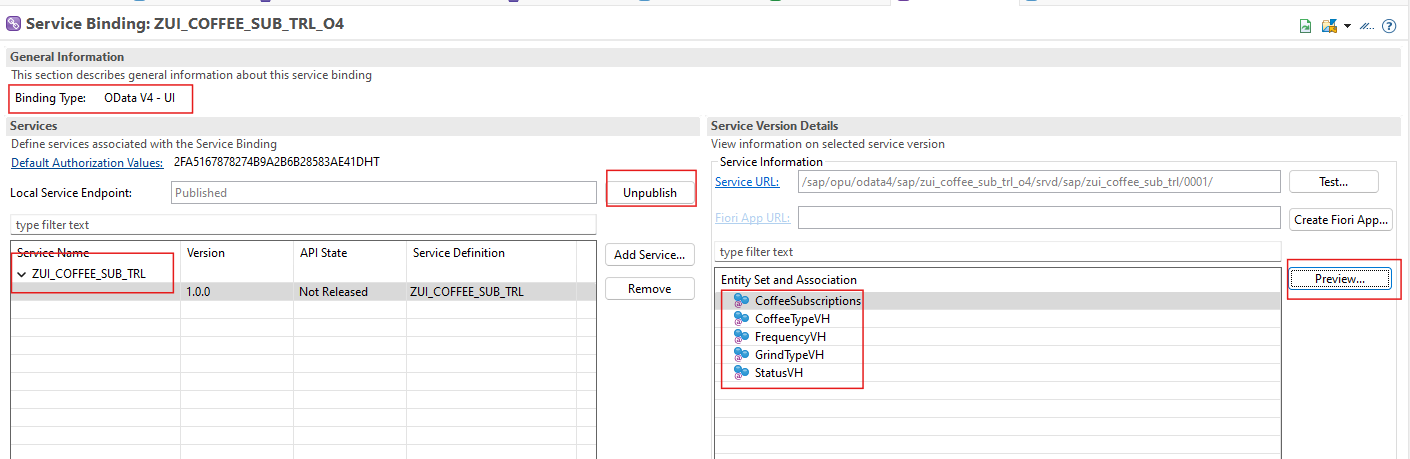
Goal: expose the OData V4 API.

Service binding setup screenshot
See explanation
Service Definition
The Service Definition is the exposure contract for the RAP business object. It selects which CDS projections are exposed externally without impacting the internal model.
It acts like an API contract that guarantees a stable interface for UI or integrations.
Key points
  • Controlled exposure of RAP entities
  • Clear separation between internal model and exposed surface
  • Prepared for UI consumption or future integration
Service Binding
The Service Binding is the final step that makes the RAP object consumable. It binds the Service Definition to a concrete protocol (typically OData V4) and generates:
  • the endpoints required by Fiori Elements UI.
This is where the service is activated, tested, and published.
Why OData V4
  • better RAP integration,
  • consistent, standard Fiori Elements UI generation.
Compared with classic ABAP
Classic exposure often relies on:
  • hand-built OData services (SEGW),
  • manual mapping and UI-specific logic.
With RAP, the Service Definition + Binding drastically reduce custom code and provide a testable, evolvable exposure layer aligned with real project contexts.
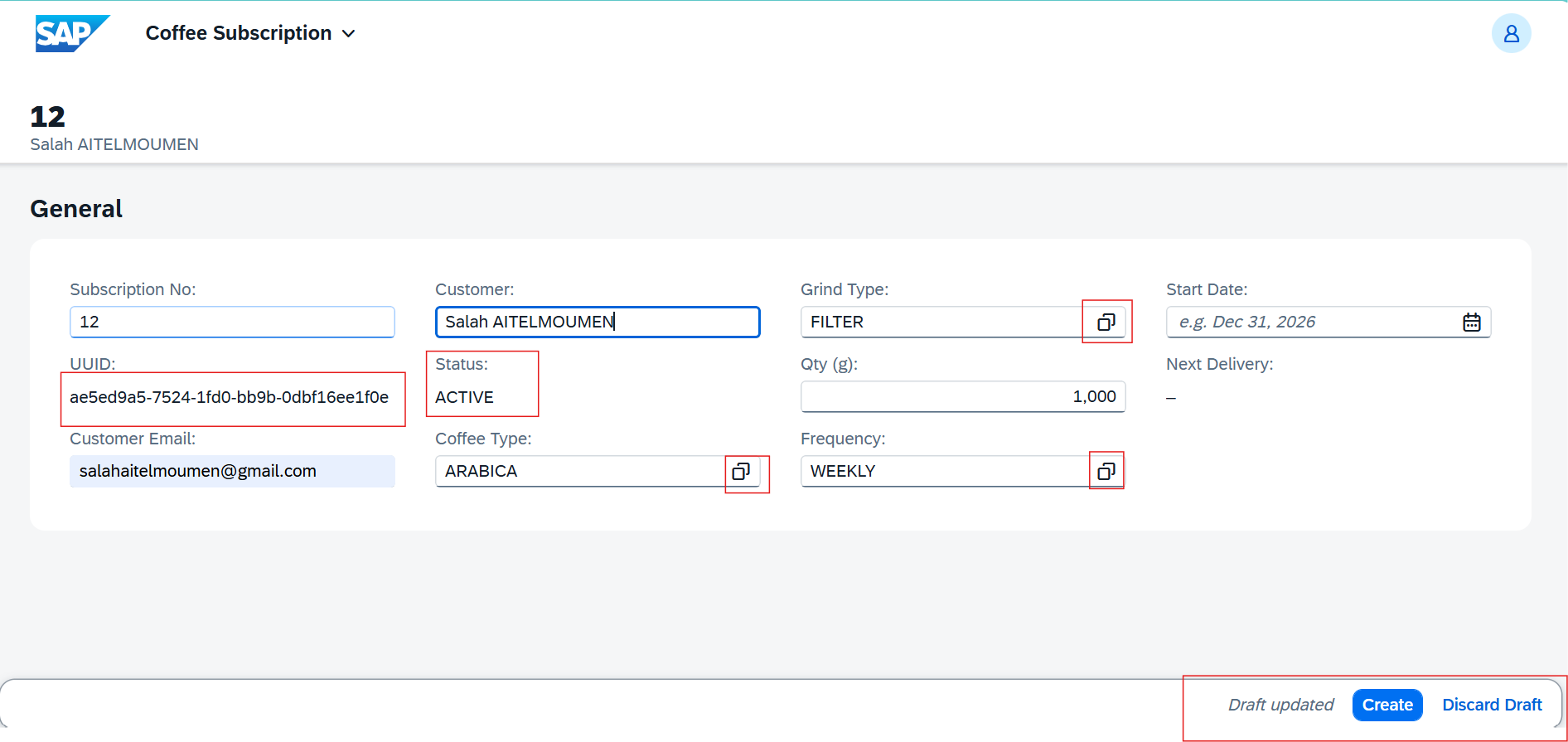
4. Draft

Goal: allow draft editing.

Fiori draft mode screenshot
See snippet
managed implementation in class ZBP_I_COFFEE_SUB_TRL unique;
strict ( 2 );
with draft; // active draft handling
define behavior for ZI_COFFEE_SUB_TRL
persistent table zcs_sub_trl
draft table zcs_sub_trl_d // draft persistence
lock master
total etag local_last_changed_at
etag master local_last_changed_at
authorization master ( global )
{
  create;
  update;
  delete;
  field ( numbering : managed, readonly )
  subscription_uuid;
  field ( readonly )
  created_by,
  created_at,
  last_changed_by,
  last_changed_at,
  local_last_changed_at,
  next_delivery_date,
  status;
  action ( features : instance ) pause;
  action ( features : instance ) unpause;
  action ( features : instance ) cancel;
  validation validate_qty on save { create; update; field qty_grams; }
  validation validate_start_date on save { create; field start_date; }
  validation validate_status_transition on save { create; update; field status; }
  validation validate_email on save { create; update; field customer_email; }
  validation validate_frequency on save { create; update; field frequency; }
  determination set_defaults on modify { create; field status; }
  determination calc_next_delivery on modify { create; update; field start_date; }
  draft determine action Prepare // draft prepare flow
  {
    validation validate_qty; // draft validations
    validation validate_start_date; // draft validations
    validation validate_email; // draft validations
    validation validate_frequency; // draft validations
    validation validate_status_transition; // draft validations
  }
  draft action Edit; // draft edit
  draft action Activate optimized; // draft activation
  draft action Discard; // draft discard
  draft action Resume; // draft resume
  side effects
  {
    action pause affects field status;
    action unpause affects field status;
    action cancel affects field status;
  }
}
See explanation
Role of Draft
Draft mode allows temporary changes without immediately impacting active data.
When a user creates or edits an object, data is stored in a draft instance and becomes active only after explicit validation (Save/Activate).
This mechanism is essential to:
  • secure user input,
  • apply business rules before activation,
  • deliver a standard SAP-like experience.
Draft in the RAP flow
  • Persistence tables: active data
  • Draft tables: temporary data
  • CDS Interface & Projection: expose both states
  • Behavior Definition: drives lifecycle (draft → active)
  • Fiori Elements UI: handles draft state automatically
The RAP framework synchronizes draft and active states.
Where Draft is defined
1. Tables
A dedicated draft table is linked to the persistence table and stores changes in progress.
2. Behavior Definition (BDEF)
Draft is activated directly in the Behavior Definition.
Draft lifecycle (example)
  • User clicks Create Subscription
  • A draft instance is created
  • User fills fields (Value Helps, determinations)
  • Validations run
  • If error: draft is kept
  • If OK: Activate → data copied to active table, draft removed
Watchouts
  • validation consistency (also runs in draft),
  • determinations must handle both states,
  • draft table and technical fields must be correct.
Misconfigured drafts can cause UI inconsistencies or activation issues.
Why Draft matters in this project
Draft makes applications more robust and closer to SAP standard behavior. Mastering it is a strong indicator of RAP maturity in real project contexts.
5. Validations

Goal: enforce business checks at save time.

Validation rules screenshot
See snippet
validation check_quantity on save { field quantity; }
validation check_email on save { field customer_email; }
See explanation
Role of validations
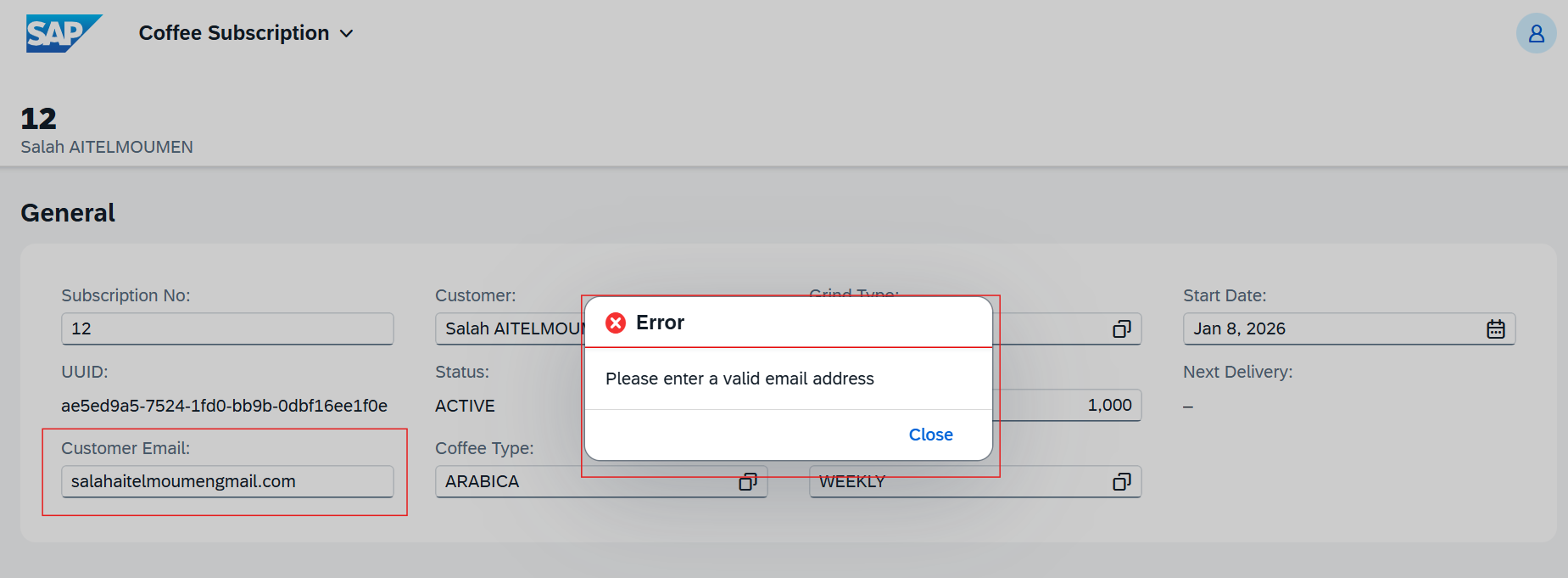
Validations ensure data consistency before a business object is saved or activated.
They block actions when a business rule is violated (missing field, inconsistent value, or functional rule breach).
On error, the user receives a blocking message and the instance remains in draft.
Place in RAP
Validations belong to the Behavior Definition (BDEF) and run:
  • on create,
  • on update,
  • and especially before draft activation.
They sit right before the draft ? active transition, ensuring only valid data is persisted.
Where to define validations
1. Behavior Definition (BDEF)
Validations are declared in the BDEF:
validation check_quantity on save { field quantity; }
2. Behavior implementation (ZBP_* class)
Business logic is implemented in the behavior class.
Concrete example
On subscription creation:
  • quantity must be strictly positive,
  • frequency must not be initial,
  • coffee type must be provided.
If a rule is violated:
  • the save is blocked,
  • an error message appears in the UI,
  • the draft is kept for correction.
Key watchouts
  • use blocking messages only when necessary,
  • target the exact field,
  • avoid heavy validations (performance),
  • do not duplicate logic with determinations.
Poor validations can:
  • unnecessarily block users,
  • degrade the Fiori experience,
  • complicate future evolution.
Compared with classic ABAP
Classic validations are often scattered in CHECKs or PAI logic.
In RAP they are centralized, declarative, and framework-executed.
Why they matter
  • only consistent data reaches the database,
  • business rules are applied uniformly,
  • the app behaves like SAP standard.
Their correct use signals strong RAP quality and maturity.
6. Determinations

Goal: automate business rules.

Determinations screenshot
See explanation
Role of determinations
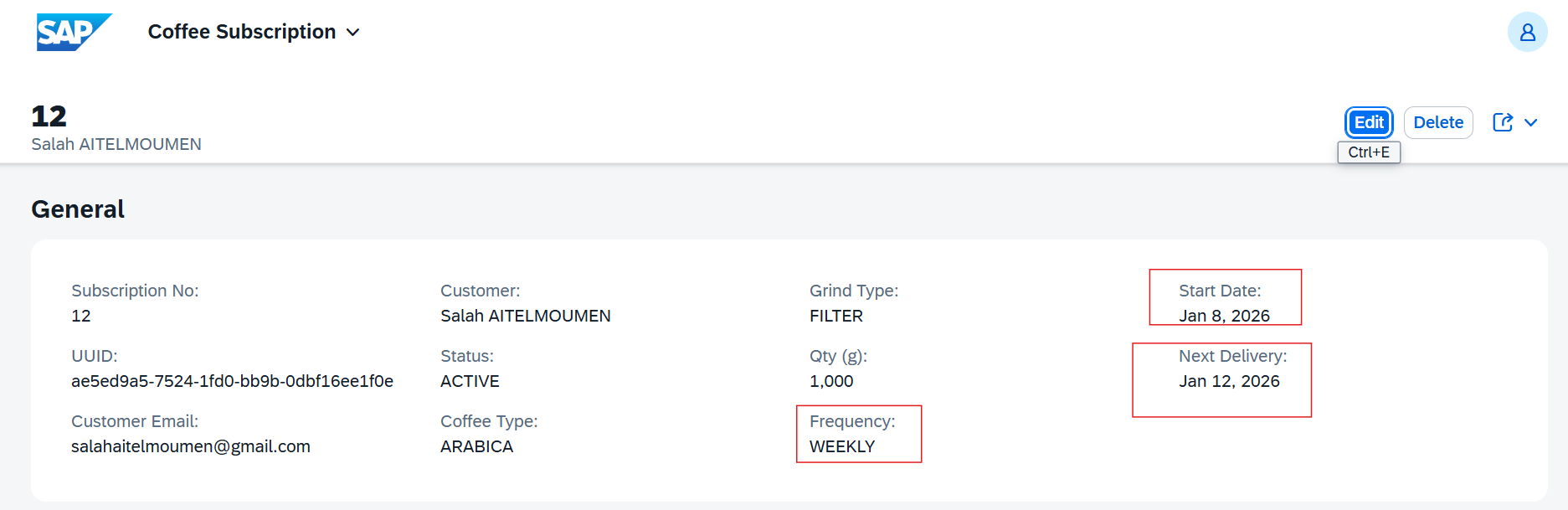
Determinations enrich or adjust data automatically without blocking the user.
Unlike validations, a determination is triggered by the framework to compute, complete, or synchronize fields.
They are ideal for implicit business rules.
Place in RAP
Determinations are part of the Behavior Definition (BDEF) and run:
  • on draft creation,
  • on modification.
They run inside the draft cycle, ensuring active data remains consistent.
Where to define determinations
Declared in the Behavior Definition:
determination set_defaults on modify { create; field status; }
Logic is implemented in the behavior class.
In Coffee Subscription
  • initialize subscription status on create,
  • calculate next delivery date based on frequency,
  • keep business fields consistent.
Users do not need to enter these values manually.
Watchouts
  • do not replace validations with determinations,
  • avoid side effects (unwanted loops),
  • respect user-entered values when appropriate,
  • keep logic simple and predictable.
Poor determinations can override user data or confuse behavior.
Compared with classic ABAP
Classic logic is often scattered across exits or UI code.
In RAP, determinations are centralized and declarative.
Why they are key in this project
  • reduce manual input,
  • strengthen data reliability,
  • deliver a SAP-standard experience.
Their use reflects solid RAP lifecycle understanding.
7. Actions

Goal: trigger targeted actions.

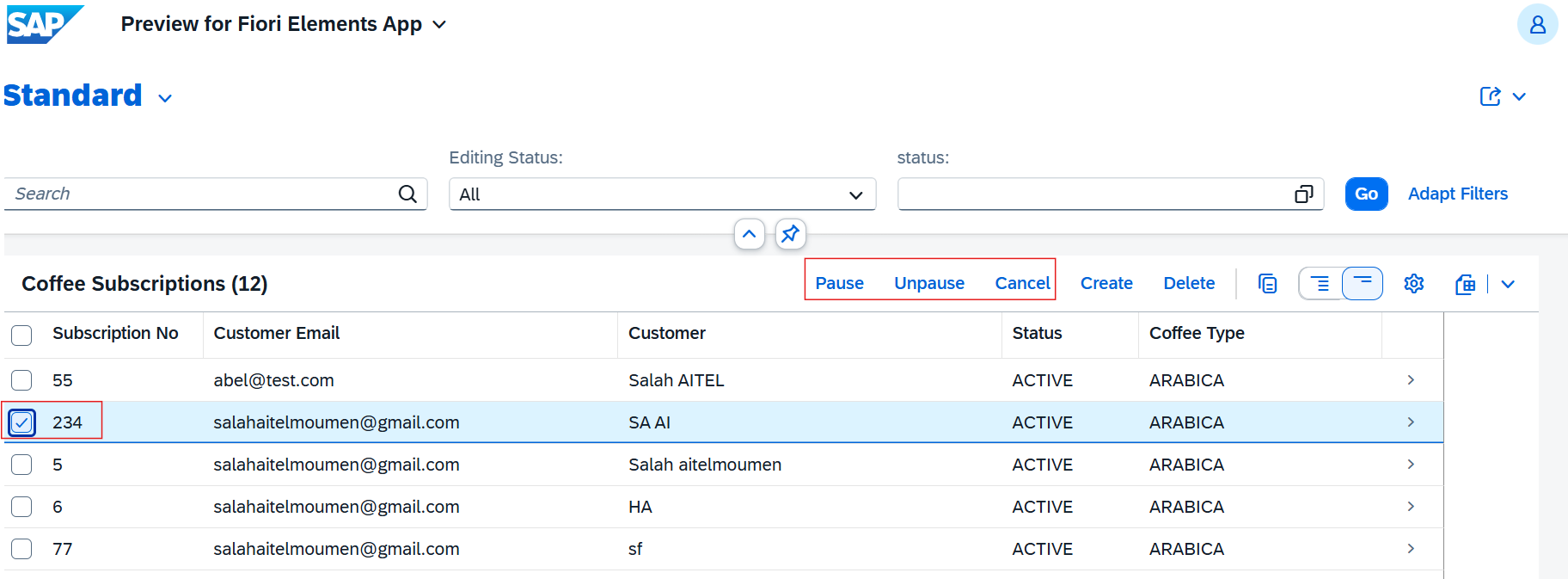
Actions screenshot
See explanation
Role of actions
RAP actions trigger explicit business operations initiated by the user.
In Coffee Subscription, actions represent controlled lifecycle transitions.
Actions are:
  • exposed automatically in Fiori Elements as buttons,
  • executed transactionally in the behavior implementation.
Where to define actions
Actions are declared in the Behavior Definition:
action pause;
action unpause;
action cancel;
Business logic is implemented in the behavior class.
Lifecycle transitions
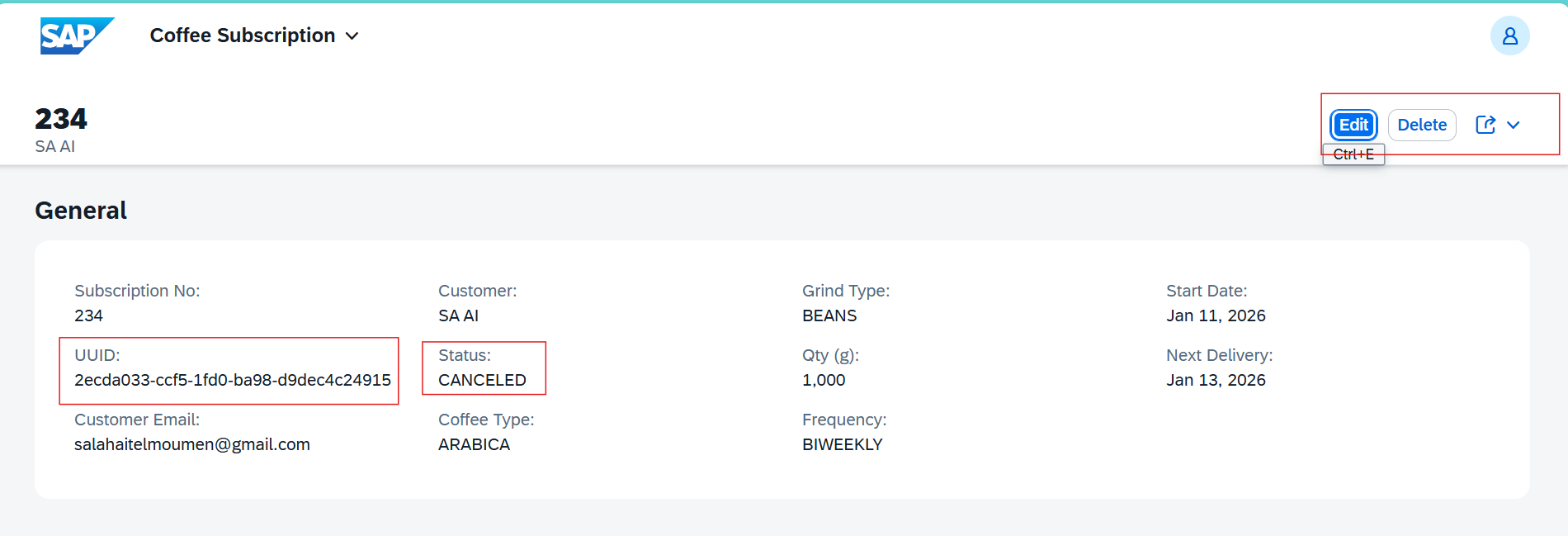
  • ACTIVE: subscription active
  • PAUSED: subscription paused
  • CANCELED: subscription stopped
These transitions reflect real business gestures and are common in production systems.
Implementation watchouts
  • verify current state before allowing an action,
  • prevent invalid transitions,
  • handle user messages clearly,
  • secure actions with authorizations if needed.
Poorly controlled actions can create inconsistent states.
Compared with classic ABAP
Classic logic is often spread across screen buttons or event code.
In RAP, actions are centralized in the business model and automatically integrated into the UI.
Why actions are a project strength
  • clarify the subscription lifecycle,
  • offer explicit, controlled interactions,
  • stay aligned with SAP standard behavior.
8. Value Helps

Goal: simplify data entry.

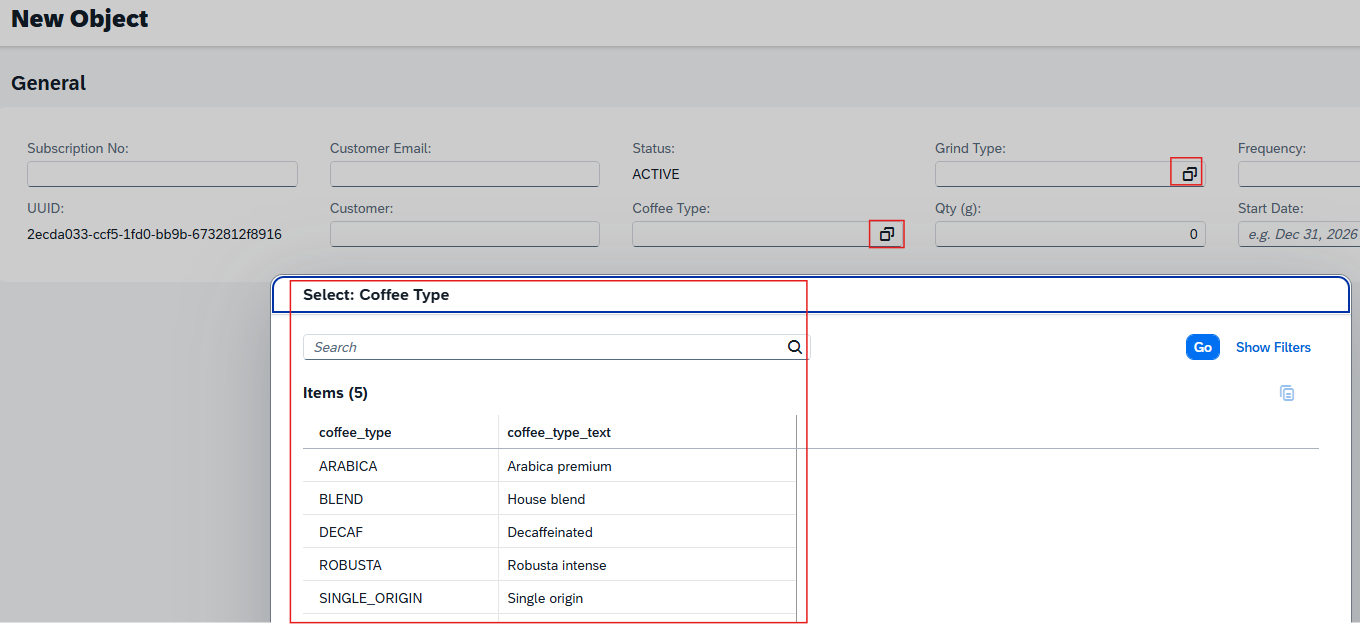
Fiori value helps screenshot
See explanation
Value Helps (VH) in SAP RAP
Value Helps guide user input by offering controlled values directly in the Fiori UI.
In RAP, they are typically implemented via:
  • a dedicated CDS Value Help view,
  • linked to the field via annotation in the CDS Projection.
This approach:
  • secures input data,
  • improves user experience,
  • centralizes selection logic.
Implementation principle
  • Create a Value Help CDS with allowed values
  • Associate it with the target field via annotation
  • Fiori Elements handles the UI display automatically
Coffee Subscription usage
  • coffee type,
  • delivery frequency,
  • subscription status.
Users select consistent values without free text.
Key point
Value Helps are native to the RAP model, with no UI-specific logic, ensuring a clean, maintainable application.
9. Error handling

Goal: handle errors cleanly.

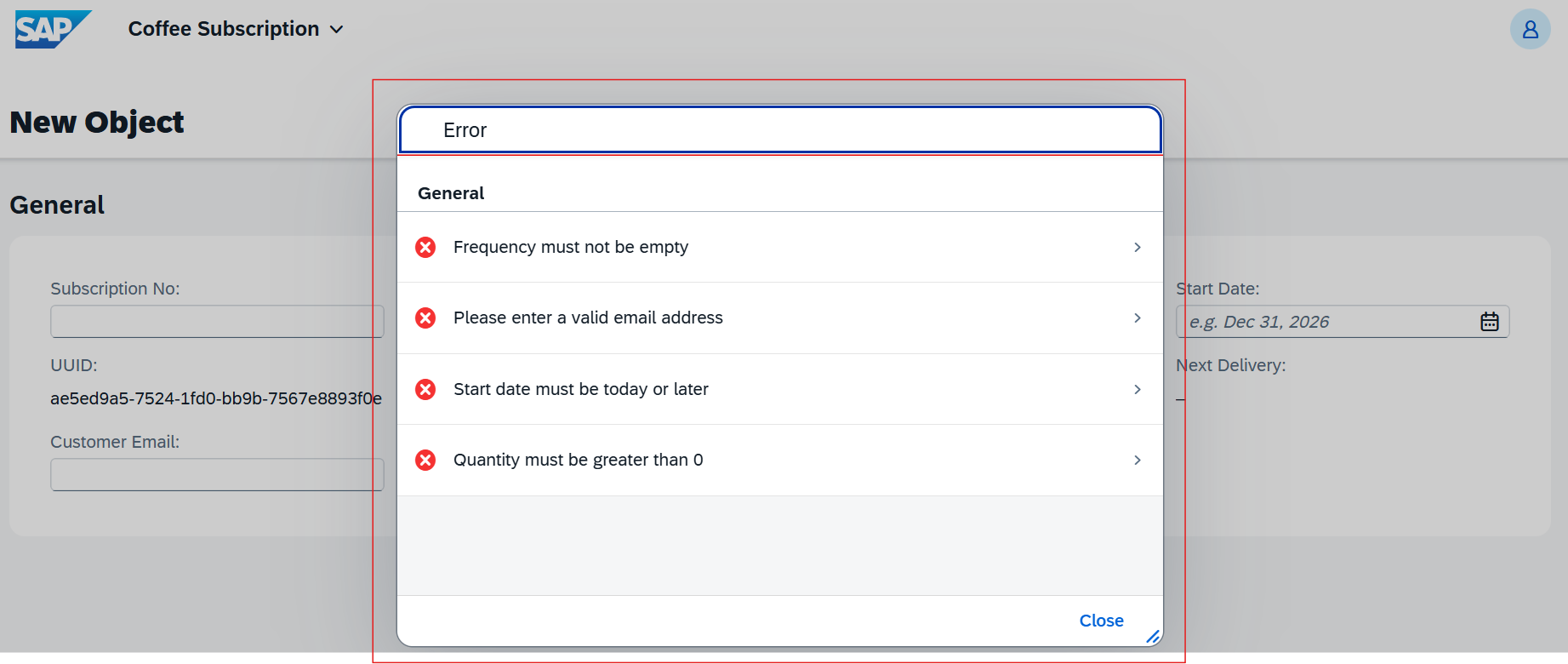
Fiori error handling screenshot
See explanation
General principle
In SAP RAP, error handling is centralized by the framework. Messages are returned to the Fiori UI without UI-specific logic.
Errors typically come from:
  • Validations
  • Actions
  • Determinations (rarely blocking)
RAP message types
Type Effect Usage
Error Blocking Invalid data, business rule violation
Warning Non-blocking Important information
Information Informational User feedback
Success Success Action confirmation
In practice
Error is most used for critical business rules.
Simple example
APPEND VALUE #(
  %msg = new_message(
    id       = 'ZMSG'
    number   = '001'
    severity = if_abap_behv_message=>severity-error
    v1       = 'Invalid subscription data'
  )
) TO reported.
  • severity-error blocks save
  • the message is displayed automatically in the UI
Coffee Subscription examples
  • quantity is zero or negative,
  • delivery frequency is missing,
  • an action (Pause / Unpause / Cancel) is triggered in an invalid state.
In those cases:
  • a blocking message is shown,
  • the object remains in draft,
  • the user can correct without data loss.
Best practices
  • use clear, business-oriented messages,
  • block only when necessary,
  • keep draft active for correction,
  • test messages in the UI.
Key point
Good RAP error handling ensures reliable data, smooth UX, and SAP-standard behavior.

Business rules

Save-time validations, automatic determinations, and status consistency to simulate a production-like context.

Cycle RAP (du point de vue utilisateur)

Create a subscription → Draft created
Choix type/frequence → Value Helps
Determinations auto (ex: prochaine livraison)
Validations (quantity > 0, frequency not initial)
Error: message shown, draft kept
OK: Save/Activate → active instance, draft removed

Example: Arabica type, monthly frequency, quantity 3. The next delivery is pre-calculated, validations pass, and the active instance is created.

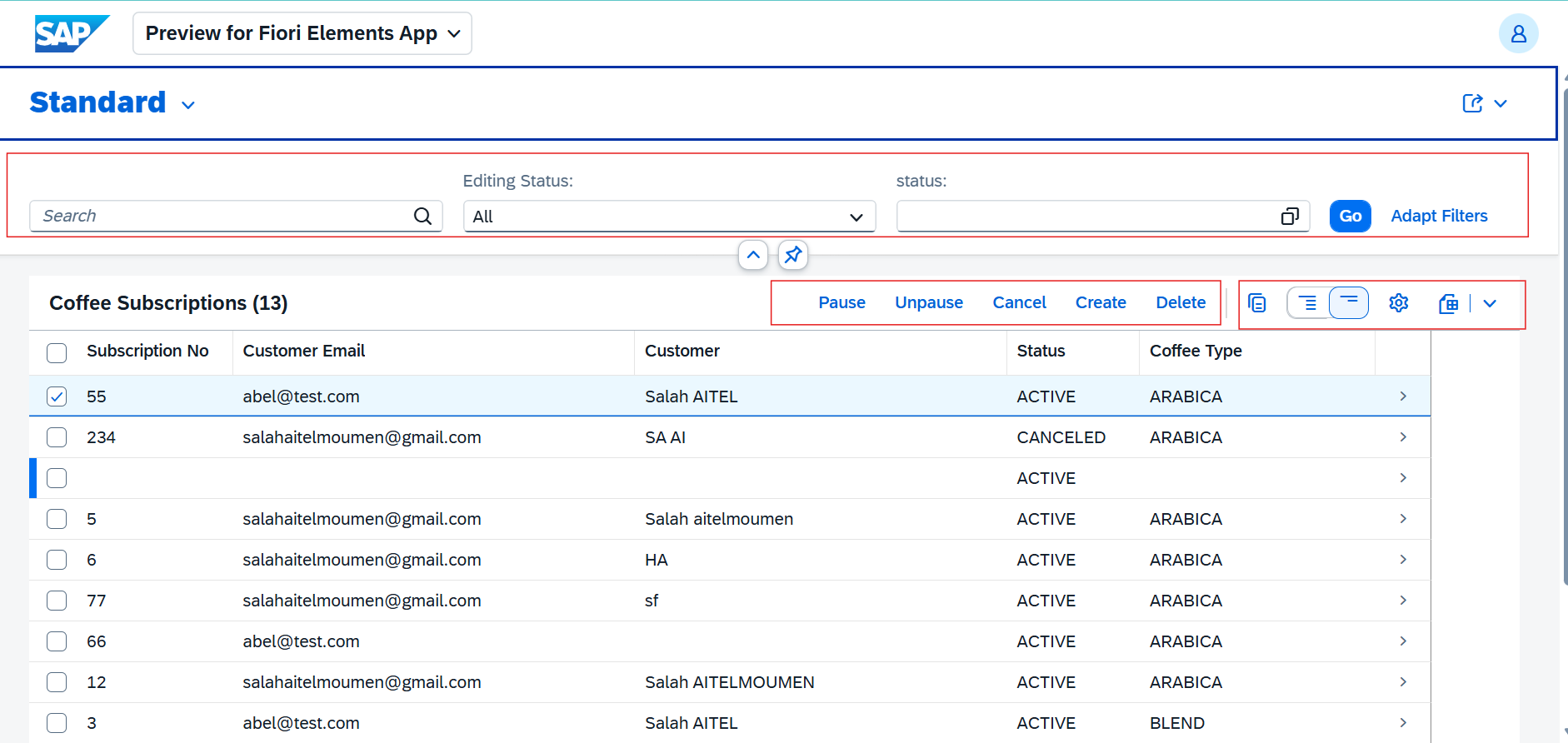
Application preview

Debug & challenges

Issue

Blocking metadata, UI would not open.

Analysis

Inconsistency on a criticality annotation.

Fix

Cleaned annotations and retested OData.

Lesson

Always validate metadata after a change.

Issue

Draft not saved correctly.

Analysis

Missing mandatory field in persistence.

Fix

Aligned table and CDS.

Lesson

Test edge cases early.

Issue

Determination errors.

Analysis

Incorrect type in the handler.

Fix

Adjusted signatures and added targeted logs.

Lesson

Isolate critical handlers.

Conclusion

This project helped me consolidate RAP fundamentals, better structure the architecture, and improve my debugging skills. In V2, I will add performance optimizations and more UI automation. If you want to learn more about my approach or SAP topics (RAP, ABAP, Fiori, performance, debugging), I share everything on my Blogs page.

Read blogs